


Family Nest: Private Locator
4.41.14K Reviews
App Specs
- Version
- 3.8.7
- Updated On
- License
- Free
- Downloads
- 1,000,000+
- Developer
- Family Nest | GPS Live Locator
- Categories
- Parenting
- Platform
- Android
Screenshots
 Analysis by AppCompare
When my family is moving in different directions, a quick location check can settle a practical question: has everyone arrived, or should I call? I find that useful only when sharing is agreed on and the app is treated as a convenience rather than a substitute for a conversation. Family Nest: Private Locator is a parenting app from Family Nest | GPS Live Locator, built around a family circle, location sharing, check-ins and SOS. Its emphasis on consent makes it a more considered choice than casually tracking someone without their knowledge.
The app is free to install, with optional in-app purchases ranging from $0.99 to $34.99 per item. It has a 4.4 average from around 28,000 ratings and more than a million installs, which gives a prospective user a sense of its reach without telling the whole story of how it will fit a particular household. It is rated for Everyone, and version 3.8.3 runs on Android 5.0 or later. I’d judge it less by the map alone than by whether everyone in the family understands when and why location sharing is useful.
Getting Started with Family Nest: Private Locator
First things first, let’s talk about the setup process. Family Nest: Private Locator is available on both Android and iOS, so you can find it in your respective app store. Downloading and installing the app was a breeze, and it didn’t take more than a couple of minutes before I was ready to roll.
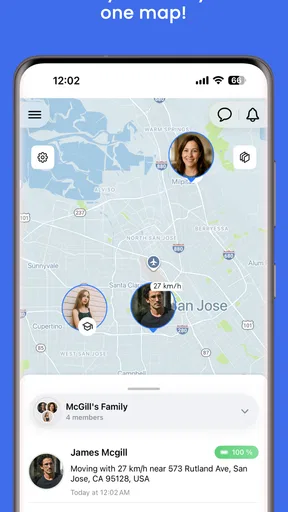
Once installed, the app prompts you to create a private family group. This is where it gets interesting. You invite family members by sending them an invite link. Once they accept, they’re added to your private circle, and you can see their real-time location on the map. It’s super intuitive and honestly, quite reassuring.
Making the family circle work in real life
The invitation step is also a useful point to agree on expectations. I’d tell everyone what the circle is for before sending invitations: perhaps coordinating school pickup or checking that someone reached a destination, rather than monitoring every movement. That small conversation can prevent a location app from feeling intrusive, especially for older children and adults who want a say in when they share.
A good first test is to use the app for a single ordinary journey and compare the map with a direct message or call. That helps the family learn where to look and what a location update can—and cannot—settle. A map can help answer “where are you?” but it cannot explain why someone stopped or whether plans changed. I’d keep a normal way to contact each other alongside it.
User Interface and Experience
The user interface is clean and straightforward. I’m not a tech wizard, so I appreciate an app that doesn’t require a manual to navigate. Everything is laid out nicely – you have your map view, a list of family members, and settings all just a tap away.
Worth Reading Before You Choose

EA SPORTS FC Mobile 26 Is a Bigger Football Game, but It Takes Time

Flipboard Shows What News Apps Must Do Beyond the Feed

Switching to Android Auto Means Rethinking Your Driving Routine

Google Calendar Makes a Crowded Week Easier to Manage

Ludo King Makes the Most of the Minutes Between Plans

Baby Panda World Brings Quick Play to Modern Phones, but Its Game Library Feels Busy
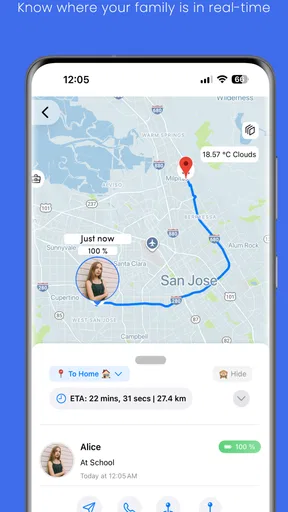
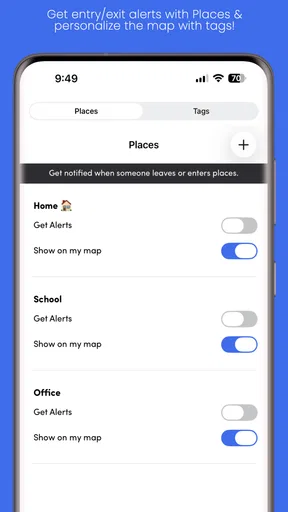
One feature I found really handy is the ability to set custom alerts. For instance, you can set up notifications for when your kids arrive at or leave school. It’s a small detail, but it makes a big difference in keeping everything running smoothly.
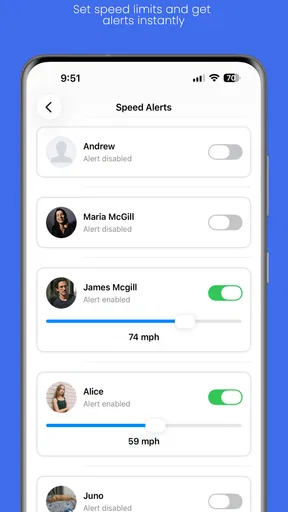
For a parent coordinating a busy afternoon, arrival and departure alerts can reduce the need to repeatedly open the map. I’d choose only the places and events that genuinely affect the day. Too many alerts can turn a helpful prompt into background noise, and then the important notification is easier to overlook. It’s worth checking notification settings together so the family knows which events will create a ping and which still need a message.
When a live location is actually useful
Imagine a rainy weekday when one parent is collecting a child after an activity while another is already on the way home. Instead of sending several “where are you?” messages, a family member can check the shared location, use a check-in to signal a milestone, and coordinate the pickup with a short message. That is the kind of modest, concrete task where the app can earn its place: it reduces uncertainty without requiring everyone to keep chatting.
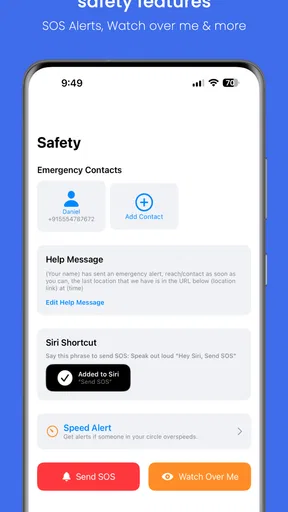
It can also help when relatives are meeting at a crowded public place or when a teenager is travelling between familiar destinations. The benefit is not that a parent can watch a map continuously; it is that agreed sharing can make a handoff or arrival easier to confirm. For emergencies, an SOS option may be a useful route to alert the circle, but I would not treat an app alert as a replacement for local emergency services or a direct call when someone is in immediate danger.
Privacy and Security
Now, I know what you’re thinking – "What about privacy?" Well, the developers have thought this through. The app prides itself on being a private locator, meaning your data is encrypted and your location is only shared with your designated circle. You’re in control of who sees what, and there’s no creepy tracking by third parties. Big thumbs up for that!
Consent is central to using a family locator well, so I would make the invitation an actual choice rather than a condition for joining a household routine. It is also sensible to revisit who is in the circle when family arrangements change. A shared map is personal information; limiting the group to people who need it is a practical privacy habit, not merely a setup detail.
For children, the right balance depends on age and circumstances. A younger child may need an adult to manage the setup, while an older child may reasonably want to know when location sharing is active and how it is used. I’d explain the purpose in plain language and avoid using location checks as a way to challenge every detour. That approach is more likely to preserve trust than treating the map as proof of someone’s choices.
Features That Stand Out
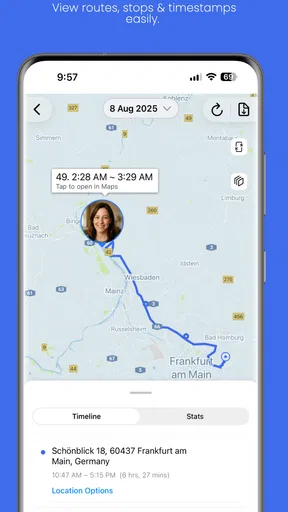
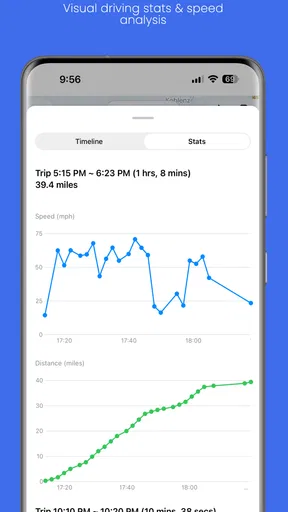
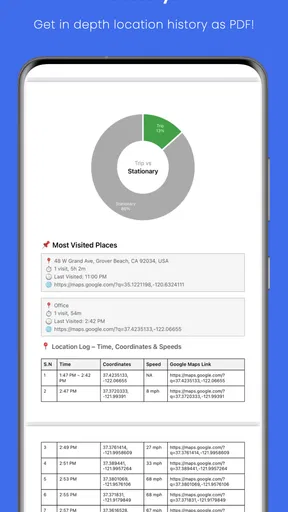
Besides the basic location tracking, there are a few features that really make Family Nest: Private Locator stand out. One is the ability to check the location history. So, if you want to see where your partner was yesterday, it’s all there on the app.
Another cool feature is the integrated chat. It’s nothing fancy, but having quick text messaging within the app means you don’t have to switch between platforms to communicate with family members.
In practice, I’d use chat for brief coordination—“I’m at the entrance” or “please wait by the pickup point”—rather than as a replacement for a family’s usual messaging app. Keeping the message tied to the location context can be convenient, but splitting conversations across several apps can also make replies easier to miss. A household that already has a well-used group chat may prefer to keep longer discussions there and use this app for location-related check-ins.
Location history is best approached with restraint. It may help clarify a practical detail, such as retracing a route or understanding a missed pickup, but reviewing someone’s past movements out of curiosity can quickly feel like surveillance. I’d agree on a purpose before relying on it and avoid treating a route record as a complete account of what happened. A location trail can show places, not intent or context.
Connectivity, movement, and everyday interruptions
Because the app depends on location updates reaching the people in a family circle, connectivity shapes the experience. On a normal trip with a working mobile connection, the map can make coordination feel immediate. In a basement, a crowded venue, or a place with weak reception, updates may not arrive when someone expects them. I would read a location as the latest available clue, not a guarantee that the person is standing exactly at the displayed point at that moment.
This matters most during transitions: leaving school, changing buses, or meeting at a busy entrance. If an update looks stale, a quick message or call is more useful than repeatedly refreshing the map and assuming something is wrong. Families can agree on a simple fallback—send a check-in when leaving and contact the group if plans change—so a patchy signal does not become a source of unnecessary worry.
Phone settings and everyday habits can affect location tools, too. A device with low battery, restricted background activity, or location access turned off may not behave as expected. I’d check that each person’s phone is configured for the intended sharing and keep an eye on battery levels during long days out. Those are general realities of mobile location use, not reasons to assume the app has failed or that a family member is deliberately withholding information.
Performance and Reliability
Performance-wise, the app runs smoothly without any noticeable lags. The location updates are pretty accurate, and I haven’t encountered any bugs so far. It’s reliable, which is crucial for an app that you depend on for family safety.
Battery consumption was a concern I had before using the app. However, I was pleasantly surprised. It doesn’t drain the battery as much as I expected, which is a big win in my book.
Still, I wouldn’t make a location app the only plan for a missed connection. If the map stops changing, first consider ordinary causes such as poor reception, a phone that needs charging, or a setting that has changed. Then try a direct call or another agreed contact method. If a family member cannot be reached and there is a genuine safety concern, follow the family’s usual emergency plan rather than waiting for the map to resolve the uncertainty.
Choosing it over simpler alternatives
Compared with relying on individual texts, Family Nest brings the map, check-ins, alerts, SOS and family communication into a shared family-focused setup. That can make it more convenient for households that regularly coordinate several people, especially when arrival notifications are more useful than repeated calls. A standard messaging group may be enough for families who only need to say “I’m here,” and it avoids asking everyone to adopt another location-sharing routine.
Likewise, a phone’s built-in location-sharing option may suit people who only need occasional sharing between a couple of relatives. Family Nest makes more sense when a family wants a dedicated circle and a combination of location-oriented tools. The trade-off is that everyone who needs to participate must be comfortable joining and using it; if relatives prefer not to share location, a non-location method is the better choice.
I’d especially consider it for parents coordinating school runs, families with several daily handoffs, or relatives who often meet while travelling around town. I’d skip it if the goal is covertly following someone, if the family has no shared need for ongoing location access, or if a person would rather use occasional calls and messages. The consent-first idea only works when everyone’s agreement is real and can be discussed openly.
Cost, expectations, and who should try it
The free starting point makes it possible to see whether a family circle fits your routine before spending anything. Since optional purchases are available, I’d check the in-app purchase screen carefully and decide whether any paid option solves a specific need. The presence of purchases does not mean every household needs them; the practical question is whether the features you actually use justify paying for an extra item.
The app is aimed at a broad audience, with an Everyone content rating, but parents should still make their own decision about how location sharing fits their child’s age and family rules. I’d begin with a small, clear use case instead of treating installation as an automatic commitment to constant tracking. If the family finds the map creates more anxiety than reassurance, turning to check-ins or ordinary messages—or choosing not to use a locator at all—may be healthier.
Final Thoughts
All in all, Family Nest: Private Locator is a fantastic app for families who want to stay connected and ensure everyone’s safety. It’s user-friendly, packed with useful features, and most importantly, respectful of your privacy. Whether you’re a parent wanting to keep tabs on your kids or just someone who likes knowing their loved ones are safe, this app is worth checking out.
So, if you’re ready to give it a spin, grab it from the app store and start building your own family nest!
My overall recommendation is to treat it as a coordination aid, not a promise of uninterrupted visibility. Its strongest case is a family that agrees on sharing and has everyday reasons to check arrivals or organize pickups. A household that wants only occasional reassurance may find a quick message simpler, while anyone expecting a live map to work as a guaranteed safety system should choose a more direct plan for urgent situations.
Pros
- Accurate real-time location tracking.
- User-friendly and intuitive interface.
- Customizable alerts and notifications.
- Battery-efficient performance.
- Secure data encryption.
Cons
- Limited features in the free version.
- Occasional GPS inaccuracies.
- Requires constant internet connection.
- No support for older devices.
- Privacy concerns for some users.
FAQs for Family Nest: Private Locator
What is Family Nest: Private Locator and how does it work?
Family Nest: Private Locator is a GPS-based app designed to help families keep track of each other's locations in real-time. After downloading the app and setting up an account, users can add family members to their network. The app provides location updates on a map, ensuring that everyone knows where their loved ones are at any given time.
Is Family Nest: Private Locator safe to use, and how is my data protected?
Yes, Family Nest: Private Locator prioritizes user safety and data protection. The app uses encrypted connections to transmit location data and adheres to strict privacy policies. Only approved family members can access location information, ensuring that your data is secure and visible only to those you trust.
How accurate is the location tracking in Family Nest: Private Locator?
The location tracking in Family Nest: Private Locator is highly accurate, utilizing GPS technology to provide real-time updates. However, factors such as signal strength and device settings can affect precision. For optimal performance, ensure that your device’s location services are enabled and that you have a stable internet connection.
Can I customize notifications and alerts in Family Nest: Private Locator?
Yes, Family Nest: Private Locator allows users to customize notifications and alerts according to their preferences. You can set up geofence alerts to notify you when a family member enters or leaves a specific area, as well as receive updates on their real-time location changes, making it easier to stay informed.
Is Family Nest: Private Locator compatible with both Android and iOS devices?
Family Nest: Private Locator is available for both Android and iOS devices, making it accessible to a wide range of users. The app can be downloaded from the Google Play Store for Android users and the Apple App Store for iOS users, ensuring seamless cross-platform compatibility for families with diverse devices.


